Cyber Threats to Your Finances: Malware and Phishing
It is practically impossible to break modern banking systems' security "head-on." Because of this, attackers have shifted their focus to the most vulnerable link — the user. The scammers' main goal is to get you to voluntarily grant access to your accounts or personally install dangerous software.
1. Malicious Apps and Dangerous Files
Scammers convince the victim to "open the door from the inside" by getting them to download malicious software disguised as updates, official services, or useful utilities.
Main threats:
-
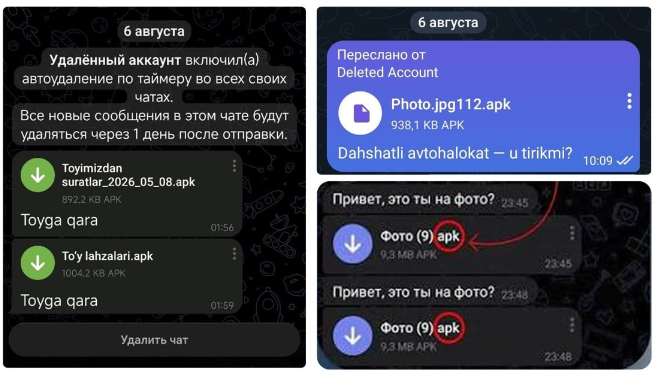
Third-party APK files — Android installation packages downloaded outside of official stores.
-
Remote Access Trojans (RAT) — tools (for example, disguised as tech support services) that let attackers fully control your smartphone.
-
Stealer viruses — malware that secretly reads incoming SMS one-time confirmation codes and sends them to the scammers.
Red flags:
-
The app is distributed through messengers, social networks, or links from SMS rather than through Google Play, the App Store, or RuStore.
-
On first launch, the program requests critical permissions: access to SMS, contact lists, calls, or "Accessibility Services." A request for Accessibility Services is one of the most dangerous markers: it allows the virus to press buttons on the screen by itself and read the contents of any app.
Protection: Only download programs from official stores. It is strictly forbidden to install third-party APK files, modified ("cracked") versions of games, or unofficial messenger clients. Turn off the "Install from unknown sources" option in your Android settings.
2. Phishing: Social Engineering and Deception
Phishing is the theft of logins, passwords, card numbers, and confirmation codes using fake emails, SMS, messenger messages, or clone websites. Here attackers manipulate emotions: they trigger fear of losing money, artificially create urgency, or lure with easy gains (promotions, payouts, prizes).

How to recognize it:
-
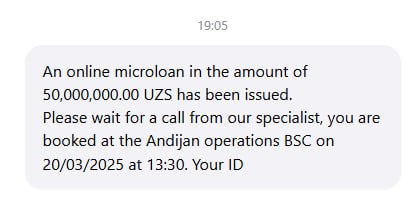
Psychological pressure: Messages demand action "right now," threatening immediate account blocking or a loan being taken out in your name.
-
Fake addresses (URLs): Phishing sites visually copy the design of online banks or marketplaces, but their domain name differs from the original (an extra letter, a character swap, e.g., 0 instead of O, or a different domain zone).
-
The illusion of safety: The presence of a "padlock" icon (HTTPS) in the address bar no longer guarantees safety — scammers obtain free SSL certificates for their fake resources en masse.
Statistics: In 2025, 58,800 cybercrimes were recorded in Uzbekistan, 97.7% of which were thefts of funds from bank cards that began with one careless click on a link.
Protection measures:
-
Always manually check the website address in the browser bar before entering your data.
-
Never, under any circumstances, enter or share SMS and push notification codes with anyone.
-
Don't follow links from unexpected messages. Type the address of the service or bank you need manually, or use previously saved bookmarks.
Additional Security Recommendations
-
Use two-factor authentication (2FA): Enable login confirmation via push notifications or authenticator apps (such as Google Authenticator) wherever possible.
-
Set card limits: Set daily limits for online transactions and transfers in your mobile banking app, and disable charges abroad if you are not traveling.
-
The pause rule: If you receive a call or message urging you to urgently transfer money, download an app, or state a code — end the conversation. Call the bank back yourself using the official number printed on the back of your card.
See also
Internal Cybersecurity Scenario Workshop
What is social engineering?